Android
- Minimum OS: Android 8.0 (Oreo)
- RAM: 2GB or higher recommended
- Browser: Chrome (recommended), Firefox
TrueFortune on Mobile
The full TrueFortune experience - pokies, live tables, banking and 24/7 support - loads instantly in your mobile browser on iOS or Android. No download. No app store.
Set Up Your Home Screen Shortcut
Mobile TrueFortune - What to Expect
Pros
Cons
Your Pocket Casino
The full TrueFortune experience - pokies, live tables, banking and 24/7 support - loads instantly in your mobile browser on iOS or Android. No download. No app store.
Get the Mobile App Play responsibly — 18+ only. Gambling involves risk and can become addictive. Bonus offers are subject to terms and conditions.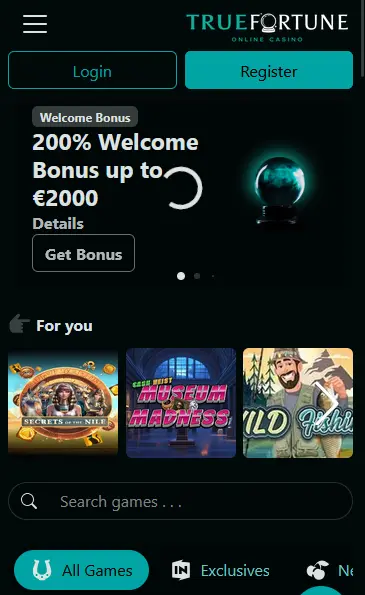
Mobile Account Security
What You Should Do
What You Should Avoid
Compatibility Requirements
Android
iOS
What the Mobile Platform Delivers
Full Lobby in Your Browser
Every game from Rival Gaming, Betsoft, Saucify, Vivo Gaming and more is accessible in Chrome or Safari on any modern smartphone or tablet without installing anything.
Instant Load via HTML5
Games are built in HTML5 with hardware acceleration, meaning pokies and live dealer streams load quickly and run smoothly without Flash or plugins.
Secure Mobile Banking
Deposit via Neosurf, Visa or Bitcoin and withdraw from the same device using the same 128-bit SSL-encrypted connection that protects desktop sessions.
TrueFortune’s mobile experience covers the same ground as the desktop site with no features removed or restricted for smaller screens. The entire catalogue of over 400 games, the full banking suite including AUD deposits and crypto withdrawals, the VIP comp points tracker and 24/7 live chat support are all accessible from a browser on any qualifying iOS or Android device.
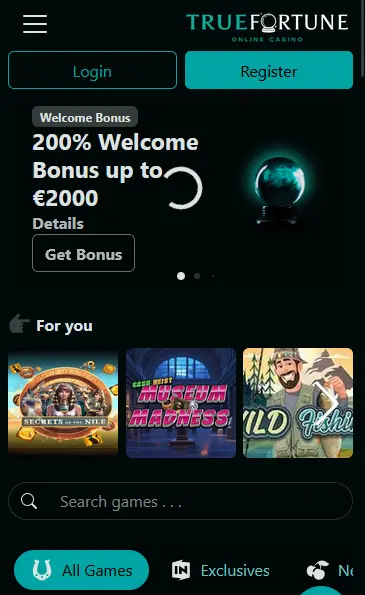
The mobile lobby is organised identically to the desktop version, with pokies from Rival Gaming, Betsoft, Saucify, Tom Horn, Spinomenal, Dragon Gaming and Qora Games sorted by category, new releases and top picks. Live dealer tables from Vivo Gaming and Fresh Deck Studios stream continuously, with Limitless Blackjack, European Auto Roulette and Live Baccarat all accessible from the mobile browser. The cashier handles deposits via Neosurf, Visa, Mastercard, Bitcoin, Ethereum, Litecoin and bank transfer, and the same methods are available for withdrawals.
The primary difference between the desktop and mobile experience is display layout rather than functionality. Menus collapse into a mobile navigation drawer, game thumbnails stack in a scrollable grid, and the live chat overlay appears as a floating button that does not disrupt gameplay. The home screen PWA shortcut removes the browser chrome to deliver a cleaner, app-like aesthetic while retaining full browser capability underneath.
TrueFortune is browser-based, so there is no installation file to download and no app store account required. The PWA shortcut is the closest equivalent to installing an app, and it takes under a minute to set up.
Open Chrome on your Android device and navigate to truefortuneslots.com. Once the page loads, tap the three-dot menu in the top right corner and select Add to Home Screen from the dropdown. Confirm the shortcut name on the prompt that appears, then tap Add. A TrueFortune icon appears on your home screen and opens the platform in full-screen mode when tapped.
Open Safari on your iPhone or iPad and go to truefortuneslots.com. Tap the Share button (the square with an upward arrow) at the bottom of the screen on iPhone or at the top on iPad. Scroll through the share sheet and tap Add to Home Screen. Confirm the name if prompted and tap Add in the top right corner. The shortcut appears on your home screen and opens TrueFortune in full-screen Safari.
The home screen shortcut launches TrueFortune without a visible browser address bar, giving the experience the feel of a native app. Sessions are retained the same way a browser session would be, meaning you do not need to re-enter login credentials after each launch unless the session has expired. No device storage is consumed beyond the icon itself, and no updates need to be manually triggered.
| Platform | Minimum Version | Recommended Browser |
|---|---|---|
| Android smartphone | Android 8.0 (Oreo) | Chrome |
| Android tablet | Android 8.0, min 2GB RAM | Chrome |
| iPhone | iOS 13, iPhone 6s or newer | Safari |
| iPad | iPadOS 13, all models | Safari |
Any device below these specifications may experience reduced performance on high-graphics Betsoft 3D pokies or HD live dealer streams from Vivo Gaming.
Rival Gaming’s complete pokie catalogue is mobile-optimised, including Mythic Wolf, Blazin’ Buffalo, Wild Carnival, Diamond Dragon and Wrath of Medusa. The i-Slot format with its storyline progression and unlockable bonus chapters runs smoothly on touch screens, with portrait and landscape orientations both supported. Betsoft’s 3D titles including Giovanni’s Gems run via hardware-accelerated HTML5 and maintain full animation quality on qualifying devices.
Vivo Gaming and Fresh Deck Studios stream live dealer tables continuously, and all tables in the live lobby are accessible from the mobile browser. European Auto Roulette and Limitless Blackjack are available around the clock. The in-game chat function connects you directly to dealers and other players at the table, and camera angle switching works via touch controls.
Blackjack, roulette, baccarat, video poker formats including Jacks or Better and Deuces Wild, craps and specialty games are all present in the mobile lobby. Progressive jackpot titles from Rival Gaming and Betsoft are accessible from mobile, with live jackpot totals displayed in the lobby.
The 200% deposit match up to $2,000 and the 50 no-deposit free spins credited on registration are both claimable and playable entirely from a mobile browser. Navigate to the cashier on your phone, select the bonus from the available offers, choose Neosurf, Visa or Bitcoin as your deposit method and complete the transaction. The bonus credits automatically. Maximum bet per spin while wagering: AU$10. 35x wager applies. 18+ only. T&Cs apply.
All payment methods are accessible through the mobile cashier. Deposits are instant for Neosurf vouchers, Visa, Mastercard and crypto. Bank transfer deposits take one to three business days depending on the sending institution.
| Method | Deposit Time | Withdrawal Time |
|---|---|---|
| Bitcoin / Ethereum / LTC | Instant | Hours once approved |
| Neosurf | Instant | Deposit only |
| Visa / Mastercard | Instant | 3-5 business days |
| Skrill / Neteller | Instant | 24-48 hours |
| Bank Transfer | 1-3 business days | Up to 18 business days |
Every transaction processed through the mobile cashier uses the same 128-bit SSL encryption as the desktop platform. KYC verification via government-issued photo ID and proof of address is required before the first withdrawal is processed, regardless of the device used to make the request.
Visit truefortuneslots.com on your mobile browser and tap Join Now. Complete the form with your full name, email address, password and preferred currency (select AUD for Australian dollar play). Verify your account via the email link and return to the site to log in and access the full lobby.
Returning players tap Login at the top of the mobile homepage, enter their registered email and password, and land directly in the game lobby. If you have added the PWA shortcut to your home screen and the session is still active, the shortcut opens directly to your logged-in account.
The 128-bit SSL certificate that protects the desktop site applies equally to all mobile sessions. Financial and personal data is encrypted in transit and stored securely in line with the Curacao eGaming licence requirements held by Carletta N.V.
Using your device’s built-in biometric security (Face ID on iPhone, fingerprint on Android) as the screen lock prevents unauthorised access to an open TrueFortune session. If your device supports it, setting up two-factor authentication for your email account adds a second layer of protection to the password recovery route.
The live chat overlay is available on every page of the mobile site, including in-game. Tap the chat icon to open a real-time session with our support team without leaving the game you are playing. Email queries can be sent to [email protected] at any time.
Deposit limits, cooling-off periods and self-exclusion requests can all be submitted through the account area on mobile. These tools are accessible 24/7, and our support team is available via live chat if you need assistance activating any responsible gaming control immediately.
Mobile Play - Questions Answered
TrueFortune does not offer a native download through Google Play or the App Store. The platform runs as a PWA accessed through Chrome or Safari, and a home screen shortcut can be added for app-style access.
Android devices running Android 8.0 (Oreo) or higher and iOS devices on iOS 13 or above are fully supported. iPhone 6s and newer are compatible, as are all iPads running iPadOS 13 or later.
Yes - all bonuses including the 200% deposit match up to $2,000 and the 50 no-deposit free spins are available in full from the mobile browser. Navigate to the cashier on your phone to select and activate any offer. 18+ only. T&Cs apply.
Because TrueFortune is browser-based, updates happen automatically on the server side. Simply refresh the page in your browser to load the latest version with no manual update step required.
Start Playing on Mobile Today
Grab 200% up to A$2,000 and 50 free spins.
Enter Casino Play responsibly — 18+ only. Gambling involves risk and can become addictive. Bonus offers are subject to terms and conditions.